2. More Assumptions of General Linear Models
No Anomalous Data
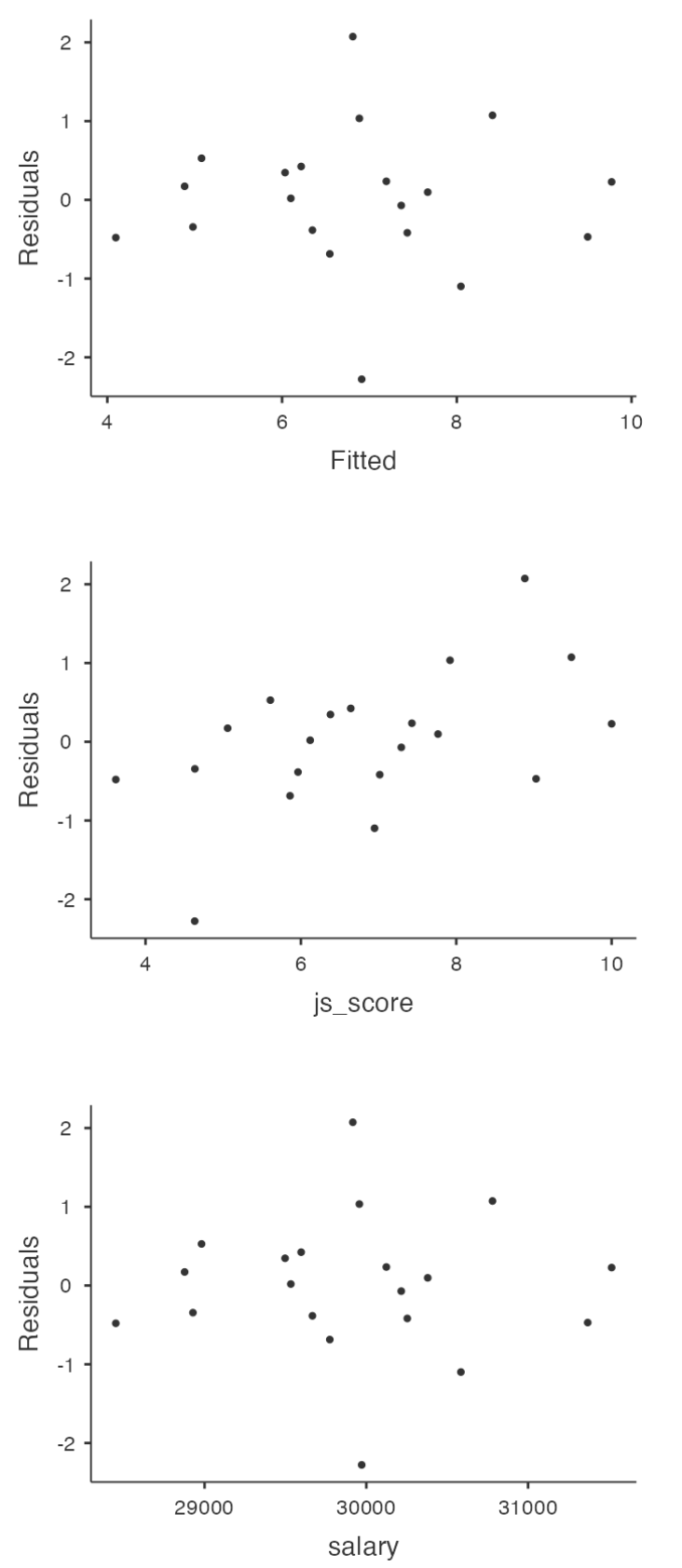
Again, not actually a technical assumption of the model (or rather, it’s sort of implied by all the others), but there is an implicit assumption that your General Linear Regression Model isn’t being too strongly influenced by one or two anomalous data points because this raises questions about the adequacy of the model and the trustworthiness of the data in some cases.
No Anomalous Data
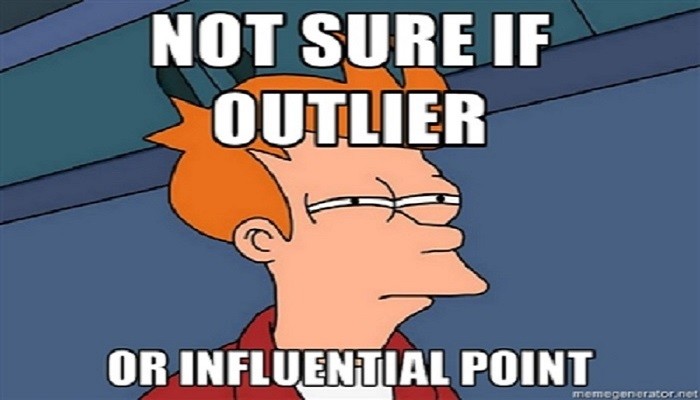
Three kinds of anomalous data
- Harmless Outlier Observations
- High Leverage Observations
- High Influence Observations
![]()
Harmless Outlier Observations
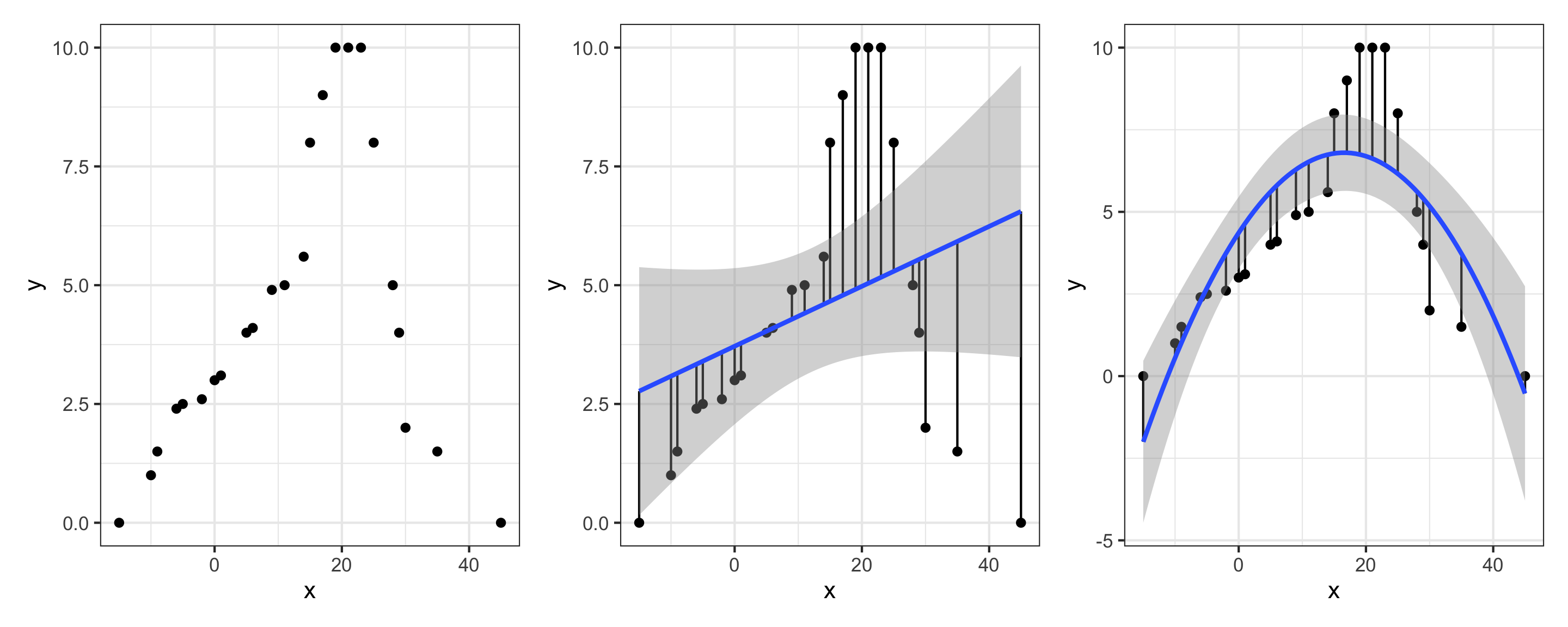
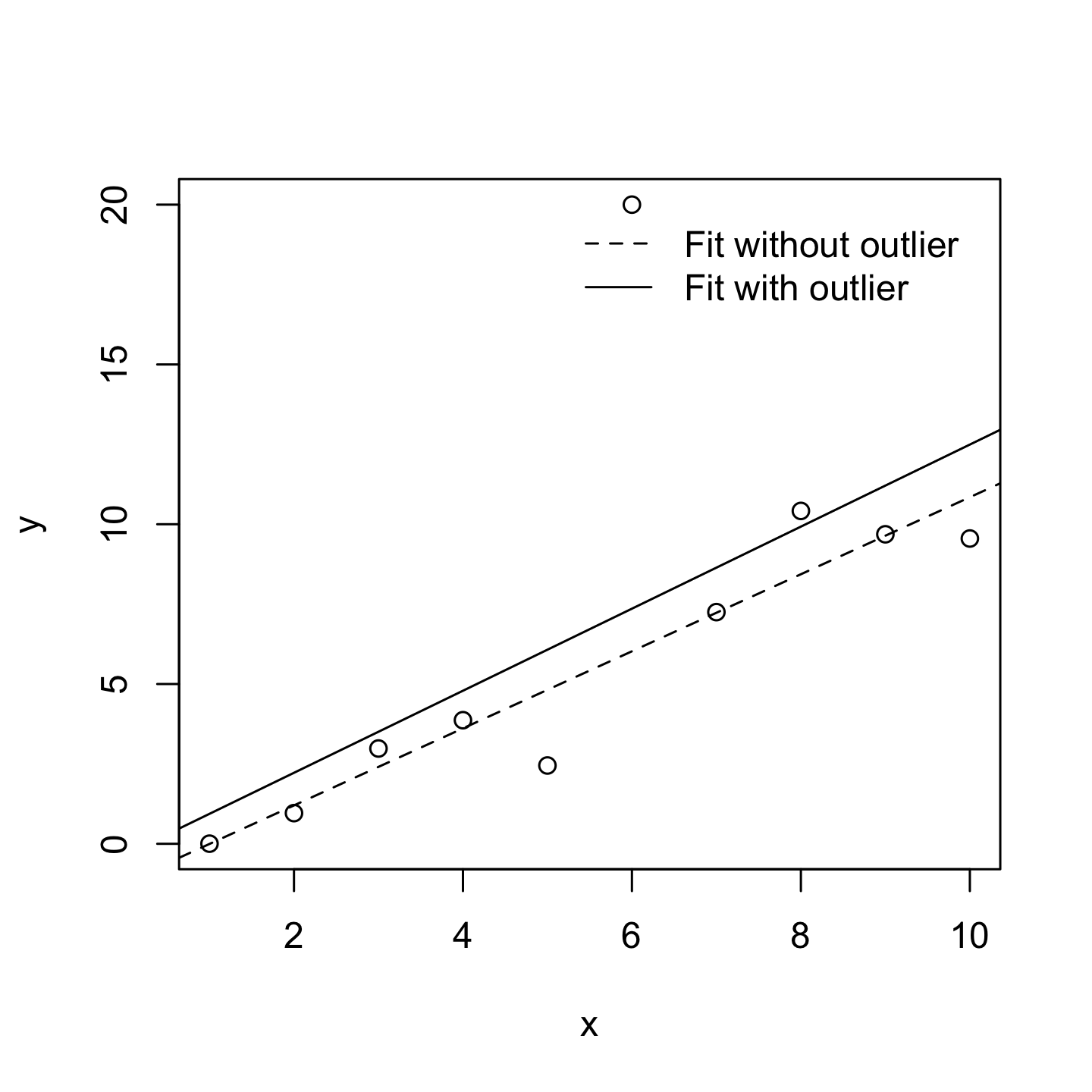
A “harmless” outlier is an observation that is very different from what the General Linear Regression Model predicts. In practice, we operationalise this concept by saying that an outlier is an observation that has a very large Studentised residual.
Harmless Outlier Observations
A big outlier might correspond to junk data, e.g., the variables might have been recorded incorrectly in the data set, or some other defect may be detectable.
You shouldn’t throw an observation away just because it’s an outlier. But the fact that it’s an outlier is often a cue to look more closely at that case and try to find out why it’s so different.
High Leverage Observations
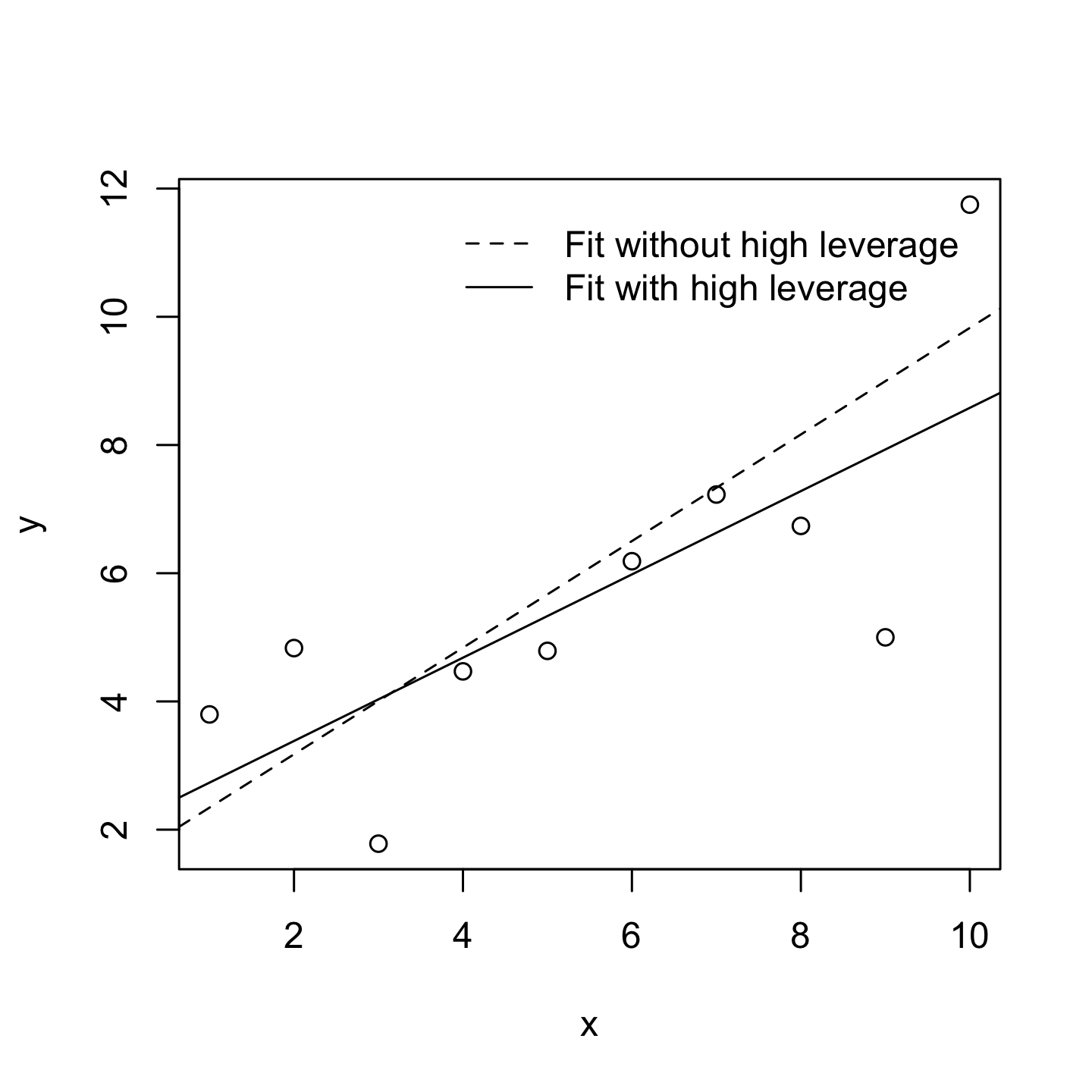
The second way in which an observation can be unusual is if it has high leverage, which happens when the observation is very different from all the other observations and influences the slope of the linear regression.
High Leverage Observations
This doesn’t necessarily have to correspond to a large residual.
If the observation happens to be unusual on all variables in precisely the same way, it can actually lie very close to the regression line.
High leverage points are also worth looking at in more detail, but they’re much less likely to be a cause for concern.
High Influence Observations
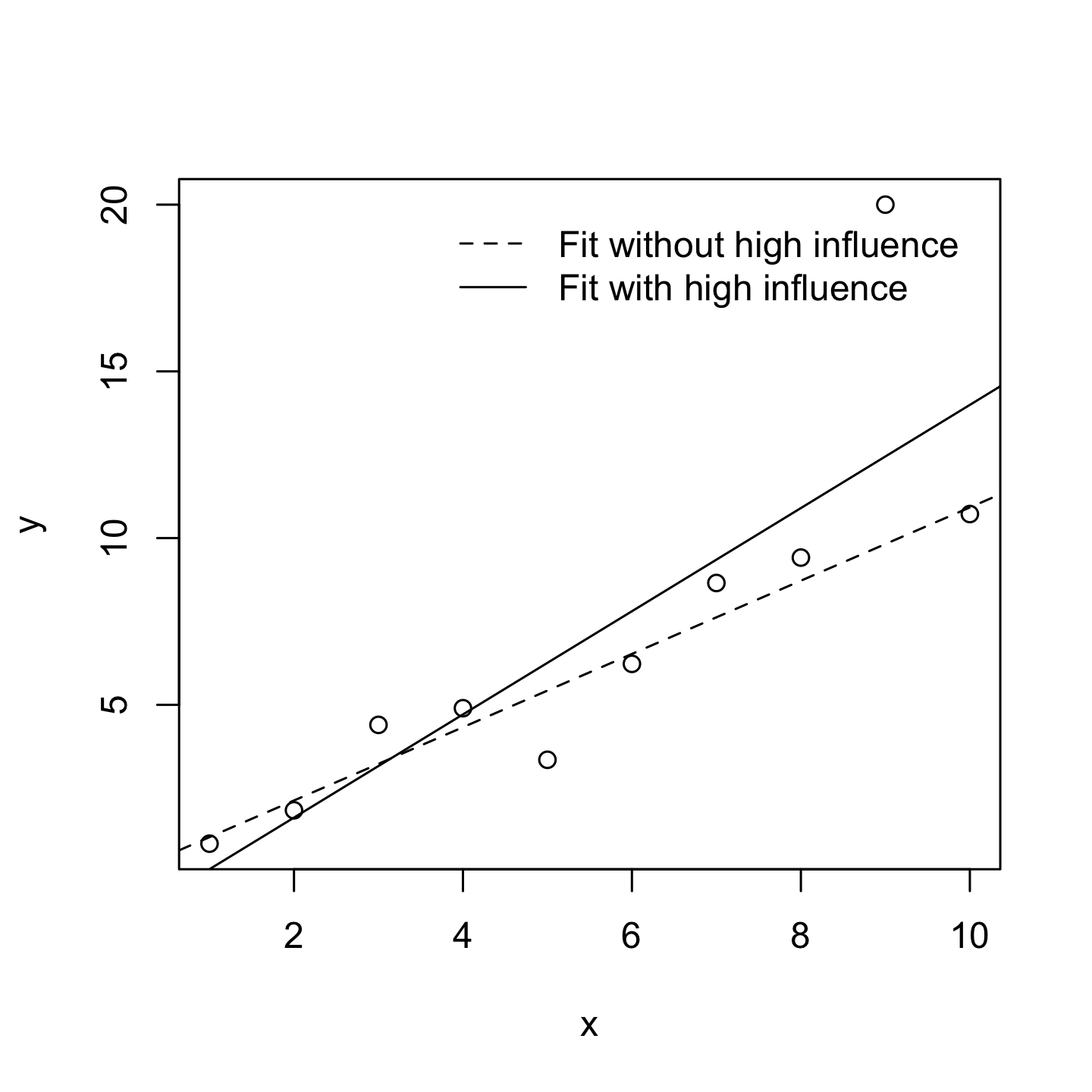
A high influence observation is an outlier that has high leverage. That is, it is an observation that is very different to all the other ones in some respect, and also lies a long way from the regression line.
High Influence Observations
We operationalise influence in terms of a measure known as Cook’s distance.
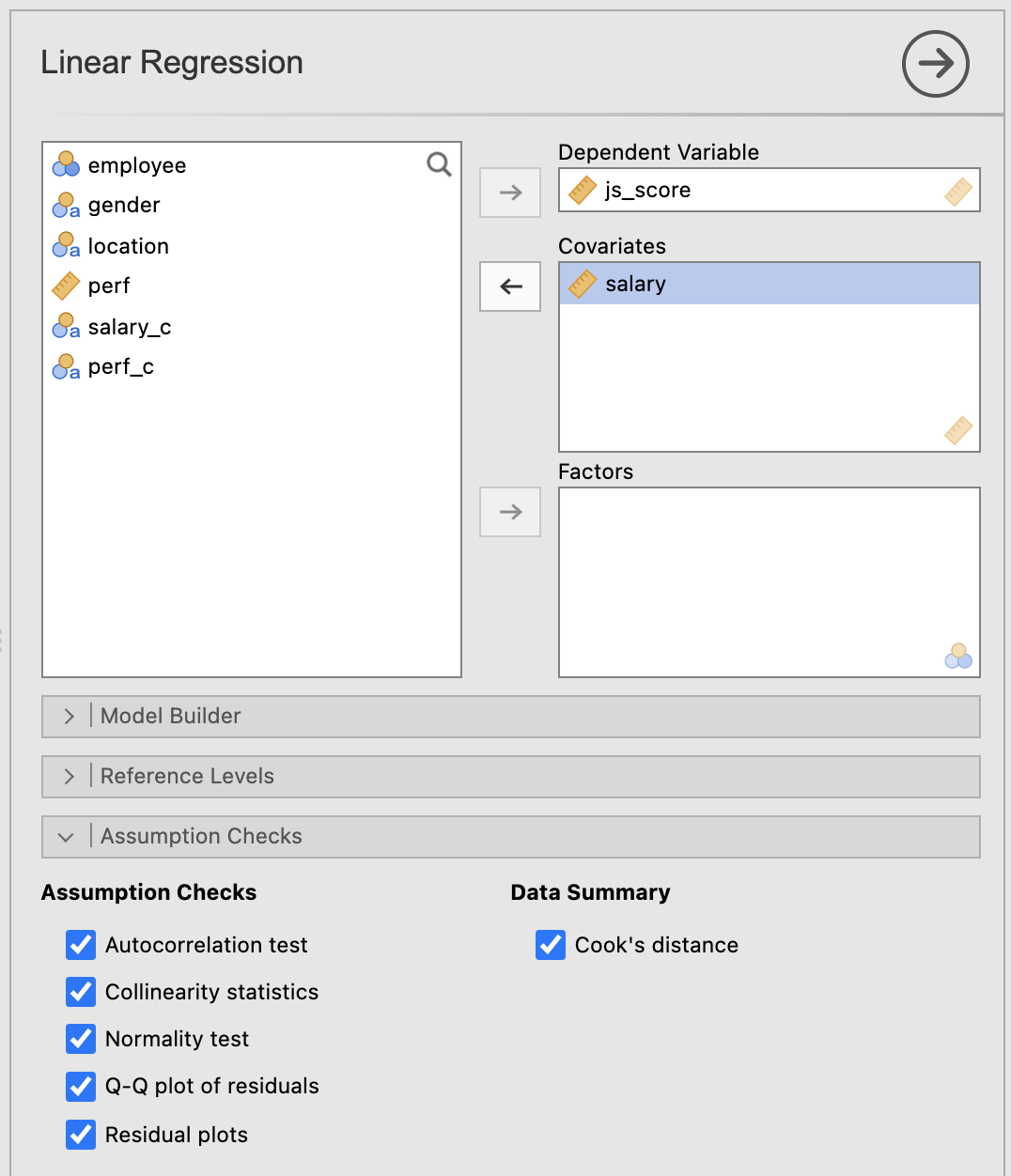
In Jamovi, information about Cook’s distance can be calculated by clicking Assumption Checks > Data Summary options.
For an observation, a Cook’s distance greater than 1 is considered large. However, Jamovi provides only a summary, check the maximum Cook distance and its average to know if some observations have high influence.
First Warning
Model Selection is also called Hierarchical Linear Regression but is NOT Hierarchical Linear Model.
- Hierarchical Linear Regression compares 2 or more models with fixed effects
- Hierarchical Linear Model compares 2 or more models with random effects (also called Multilevel Model)
Here we are using the term Model Selection for Hierarchical Linear Regression.
Default Model Testing
Imagine you are testing the model that includes the variables \(X\) and \(Z\) have an effect on the variable \(Y\) such as:
\[H_a: Y = b_{0} + b_{1}\,X + b_{2}\,Z + e\]
If nothing is specified, the null hypothesis \(H_0\) is always the following:
\[H_0: Y = b_{0} + e\]
Default Model Testing
But when there are multiple predictors, the \(p\)-values provided are only in reference to this simplest model.
If you want to evaluate the effect of the variable \(Z\) while \(X\) is taken into account, it is possible to specify \(H_0\) as being not that simple such as:
\[H_0: Y = b_{0} + b_{1}\,X + e\]
This is a Model Comparison!
Default Model Testing
Example, imagine a model predicting \(js\_score\) with \(salary\) and \(perf\):
\[js\_score = b_{0} + b_{1}\,salary + b_{2}\,perf + e\;(full\;model)\]
In the Model Fit table of Jamovi, this model will be compared to a null model as follows:
\[js\_score = b_{0} + e\;(null\;model)\]
Default Model Testing
However it is possible to use a more complicated model to be compared with:
\[js\_score = b_{0} + b_{1}\,salary + e\;(simple\;model)\]
Comparing the full model with a simple model consists of evaluating the added value of a new variable in the model, here \(perf\).
Model Comparison
A model comparison can:
- Compare Full Model with a shorter model (called Simple Model)
- Indicates if a variable is useful in a model
This principle is often referred to as Ockham’s razor and is often summarised in terms of the following pithy saying: do not multiply entities beyond necessity. In this context, it means don’t chuck in a bunch of largely irrelevant predictors just to boost your \(R^2\).
Model Comparison
To evaluate the good-fitness of a model, the Akaike Information Criterion also called \(AIC\) (Akaike 1974) is compared between the models:
- The smaller the \(AIC\) value, the better the model performance
- \(AIC\) can be added to the Model Fit Measures output Table when the \(AIC\) checkbox is clicked
Model Comparison in JAMOVI
In Model Builder create Block 1 as your Simple Model and a New Block 2 with the additional predictor.
Model Comparison in JAMOVI
Details of Model 1 (Simple Model) and Model 2 (Full Model):
| 1.000 |
0.855 |
0.731 |
57.018 |
48.957 |
1.000 |
18.000 |
0.000 |
| 2.000 |
0.860 |
0.740 |
58.372 |
24.157 |
2.000 |
17.000 |
0.000 |
Evaluation of significant difference between the two models:
| 1.000 |
- |
2.000 |
0.009 |
0.558 |
1.000 |
17.000 |
0.465 |
Here the difference between the two models is not statistically significant, therefore adding \(perf\) in the full model doesn’t help to increase the prediction (as indicated by the \(AIC\)).
4. Power Analysis for Sample Size and Effect Size Estimations
Theoretical Principle
Remember, the null hypothesis \(H_0\) is the hypothesis that there is no relationship between the Predictor and the Outcome.
If the null hypothesis is rejected, we accept the alternative hypothesis \(H_a\) of a relationship between the Predictor and the Outcome.
Theoretical Principle
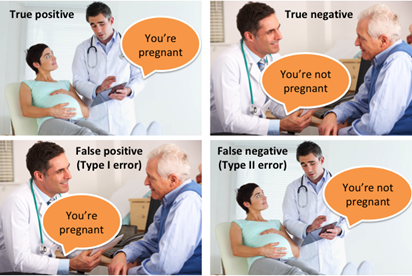
This means that four possible situations can occur when we run hypothesis tests:
- We reject \(H_0\) …
- and in fact \(H_a\) is true. This is a good outcome and one which is most often the motivation for the hypothesis test in the first place (True Positive)
- but in fact \(H_a\) is false. This is known as a Type I error (False Positive)
- We fail to reject \(H_0\) …
- and in fact \(H_a\) is false. This is a good outcome (True Negative)
- but in fact \(H_a\) is true. This is known as a Type II error (False Negative)
Statistical power refers to the fourth situation and is the probability that we are able to detect the effect that we are looking for.
Theoretical Principle
![]()
Statistical Power
The ability to identify an effect if it exists (i.e., statistical power) depends at a minimum on three criteria:
- The significance level \(\alpha\) to reject \(H_0\) (usually set at 0.05 or 5%)
- The size \(n\) of the sample being used
- The proportion of the variability of the Outcome variable explained by all the Predictors (i.e., full model), known as the effect size
Statistical Power
The minimum level of statistical power to achieve is usually set at least 0.8 or 80% (i.e., we want at least a 80% probability that the test will return an accurate rejection of \(H_0\)).
If all the criteria are known except \(n\), then it is possible to approximate the \(n\) necessary to obtain at least a 0.8 or 80% power to correctly reject \(H_0\) before running the analysis (prospective power analysis).
It is also possible to evaluate which has been achieved once the analysis has been done (retrospective power analysis).
Sample Size with Prospective Power Analysis
Sample Size Estimation
The main question of most researchers is:
“How many participants are enough to test the formulated hypotheses?”
Some would obtain a random answer from their colleagues such as “at least 100” or “at least 50 per group”.
However, there is an actual exact answer provided by the power analysis:
“It depends on how big the effect size is”
Sample Size Estimation
Prospective Power Analysis is reported in the Method section of research papers in order to describe how the sample size has been estimated thanks to an approximated effect size at the model level (e.g., small, medium, or large).
Sample Size Estimation
The values of the approximated effect size depend on the type of model tested:
- A model with 1 Main Effect of a Categorical Predictor with 2 categories uses Cohen’s \(d\)
- All other models including Main and Interaction Effect involving Categorical Predictor with 3+ categories or Continuous Predictor uses Cohen’s \(f\)
A model with only Main Effects of Continuous Predictors can use a \(f\) or \(f^2\)
Sample Size Estimation
Effect Size Rule of Thumb:
| \(d\) |
0.20 |
0.50 |
0.80 |
| \(f\) |
0.10 |
0.25 |
0.40 |
| \(f^2\) |
0.02 |
0.15 |
0.35 |
Sample Size Estimation
Power analyses using Cohen’s \(f\) effect size (i.e., all models except the ones using a Cohen’s \(d\)) are calculated with an additional parameter: Numerator df (degree of freedom)
The degree of freedom of each effect is added to obtain the Numerator df:
- In main effects
- Continuous Predictors have 1 df
- Categorical Predictors have k - 1 df (number of categories - 1)
- In interaction effects, the df of the predictors involved are multiplied
Sample Size Estimation
Example:
\[js\_score = b_{0} + b_{1}\,salary + b_{2}\,location + b_{3}\,salary*location + e\]
- \(b_{1}\,salary\) has 1 df (Continuous Predictor)
- \(b_{2}\,location\) has 2 df (3 locations - 1)
- \(b_{3}\,salary*location\) has 2 df (1 * 2)
The model’s Numerator df is 5 (1+2+2)
The number of groups is usually the same as Numerator df
Sample Size Estimation
There are multiple possibilities to perform a power analysis:
- Websites hosted online such as https://powerandsamplesize.com/ or https://sample-size.net (but none are satisfying)
- Embedded in Statistical software such as SPSS or Jamovi (but none are satisfying)
- Specific software such as G*power (free and the most used power analysis software)
- Packages for coding languages (like {pwr} in R or
statsmodels in python)
Sample Size Estimation
G*power uses 3 characteristics to determine the type of power analysis:
- Test family (e.g., t-test for models with 1 predictor either continuous or having two categories or F-test for all other models)
- Statistical test (e.g., mean comparison, ANOVA, multiple linear regression)
- Type of power analysis (e.g., prospective also called “a priori” or retrospective also called “post hoc”)
Sample Size Estimation
Whatever your model is, for Sample Size Estimation with Prospective Power Analysis use:
- F-tests
- ANOVA: Fixed effects, special, main effects and interactions
- A priori: Compute required sample size - given \(\alpha\), power, and effect size
Applied Example 1
Model Characteristics with \(js\_score\) as Continuous Outcome:
- 1 Main Effect of \(gender\) (Predictor with 2 categories: male and female employees)
Applied Example 1
Statistical Power
- Alpha of 0.05 (5%)
- Power of 0.8 (80% probability of accurately rejecting \(H_0\))
- Effect size of \(d = 0.5\) (medium)
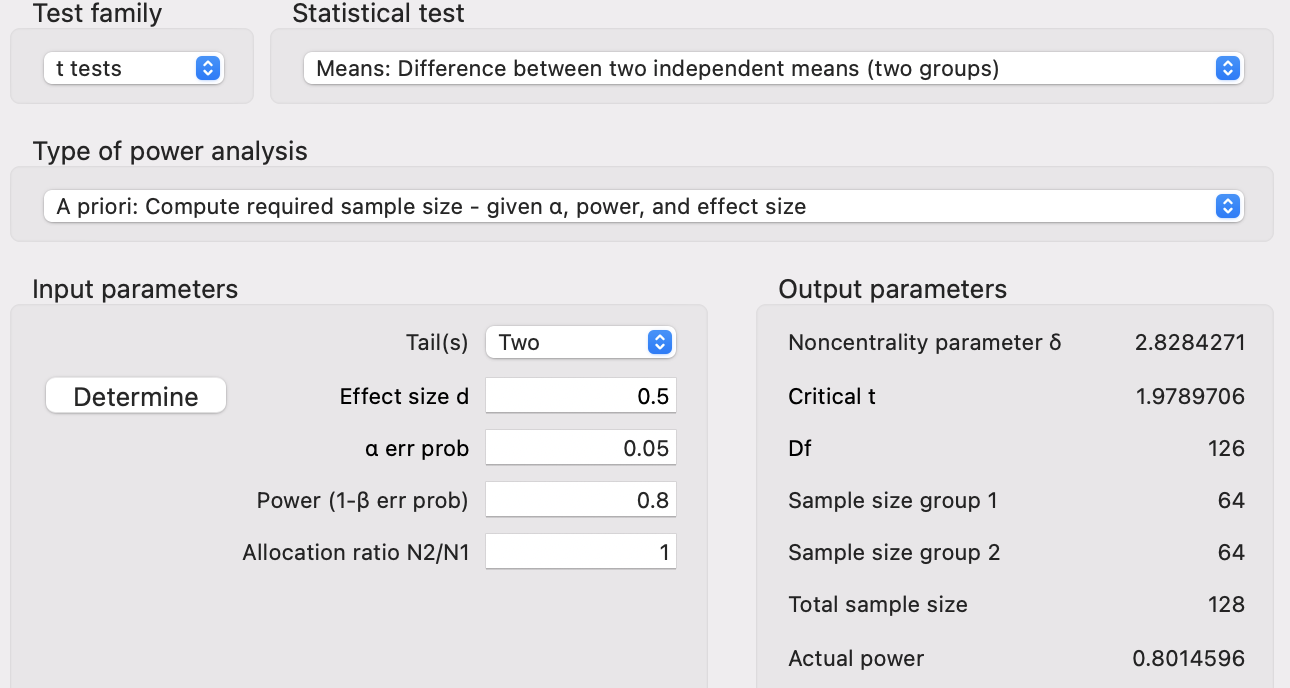
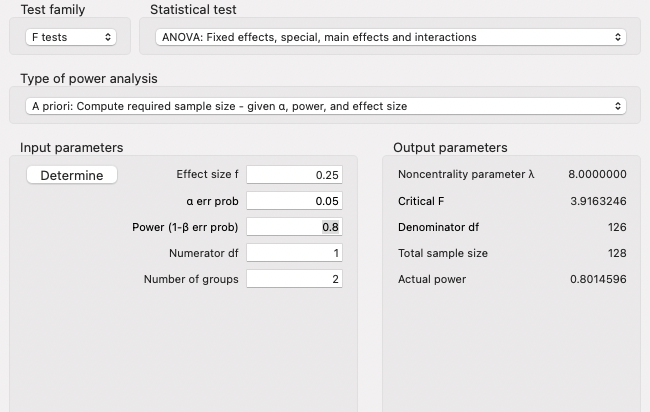
This tells us that we need an absolute minimum of 128 individuals in our sample (64 male and 64 female employees) for an effect size of \(d = 0.5\) to return a significant difference at an alpha of 0.05 with 80% probability.
Applied Example 1
![]()
Applied Example 1
![]()
Applied Example 2
Model Characteristics with \(js\_score\) as Continuous Outcome:
- 1 Main Effect of \(location\) (Predictor with 3 categories: Irish, French, and Australian)
Applied Example 2
Statistical Power
- Alpha of 0.05 (5%)
- Power of 0.8 (80% probability of accurately rejecting \(H_0\))
- Effect size of \(f = 0.25\) (medium)
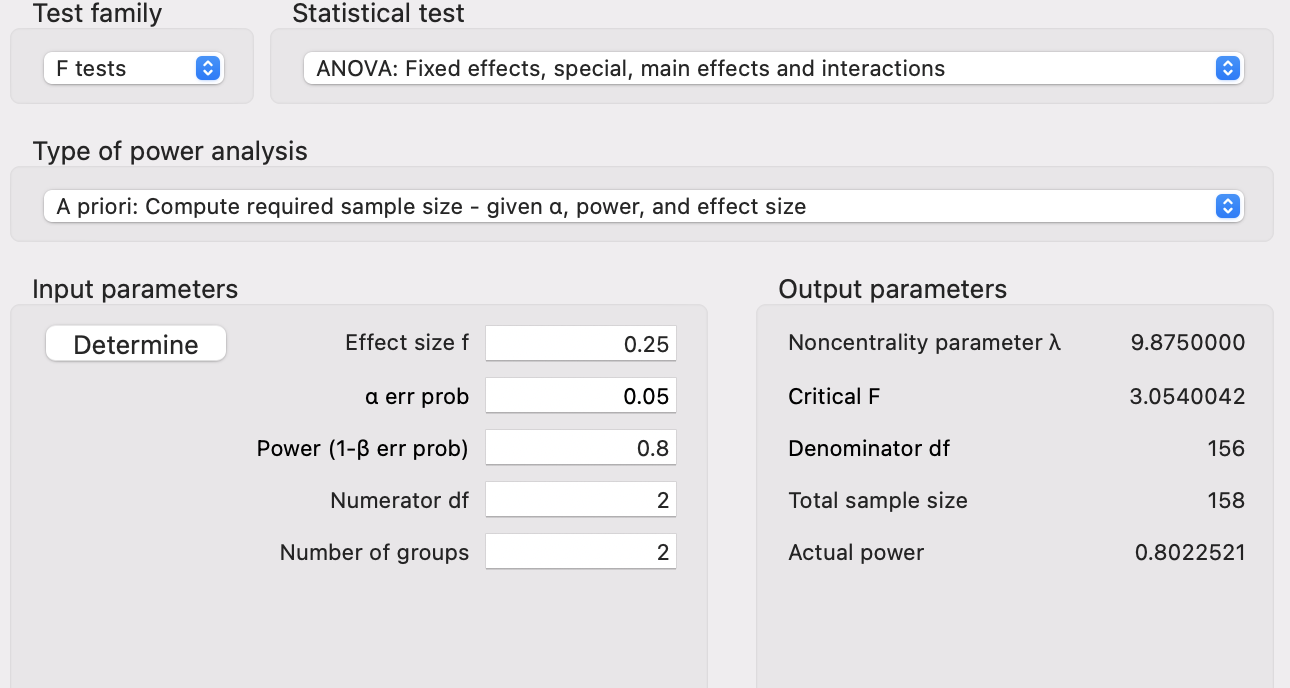
This tells us that we need an absolute minimum of 158 individuals in our sample for an effect size of \(f = 0.25\) to return a significant difference at an alpha of 0.05 with 80% probability.
Applied Example 2
![]()
Applied Example 3
Model Characteristics with \(js\_score\) as Continuous Outcome:
- 1 Main Effect of \(location\) (Predictor with 3 categories: Irish, French, and Australian)
- 1 Main Effect of \(salary\) (Continuous Predictor)
- 1 Interaction Effect of \(location\) and \(salary\)
Applied Example 3
Statistical Power
- Alpha of 0.05 (5%)
- Power of 0.8 (80% probability of accurately rejecting \(H_0\))
- Effect size of \(f = 0.25\) (medium)
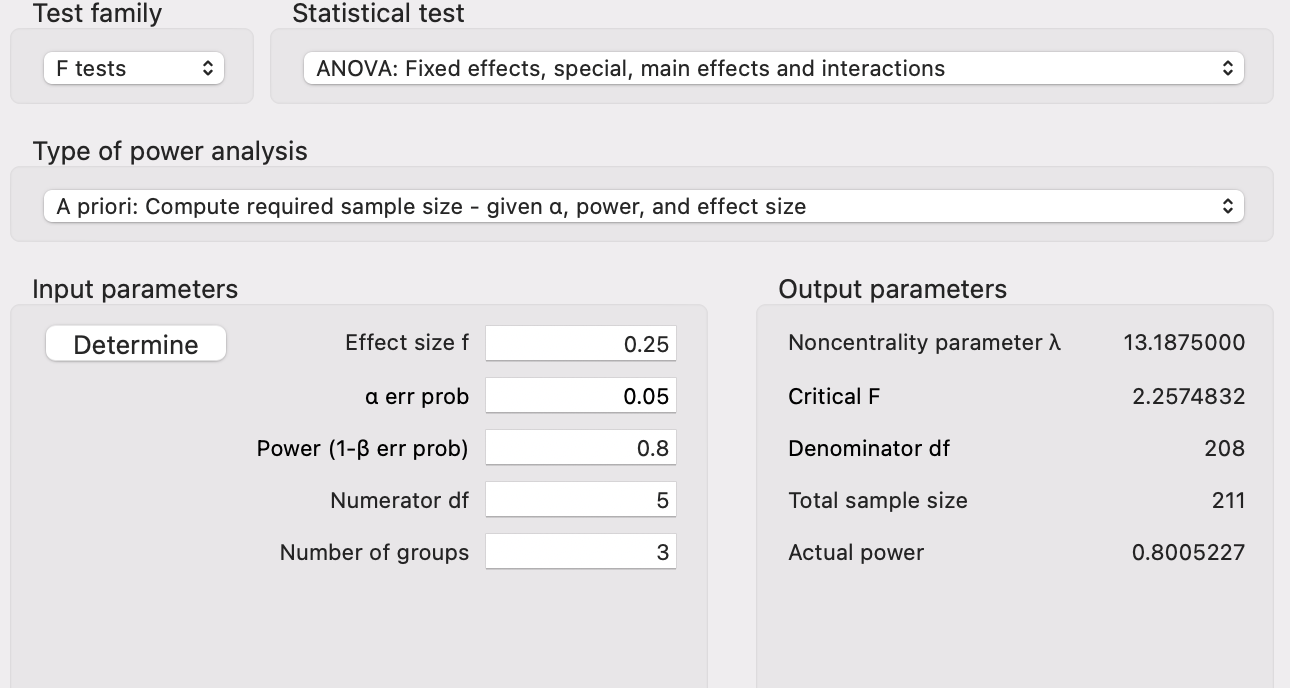
This tells us that we need an absolute minimum of 211 individuals in our sample for an effect size of \(f = 0.25\) to return a significant difference at an alpha of 0.05 with 80% probability.
Applied Example 3
![]()
6. Agentic AI for Statistical Analysis
What About AI?
Traditional AI assistants (like ChatGPT, Gemini, or Claude) respond to text prompts: you describe what you want and the AI generates text or code in return.
Give them you hypotheses and your data, they will run the calculation and print out a good quality result section!
Now, you need to supervise and check for misunderstanding (e.g., have the hypotheses tested in the same model? Are the Confidence Interval reported?)
The issue is transparency!
What is Agentic AI?
Agentic AI goes one step further: it can interact directly with software on your behalf. Instead of just telling you what to do, it can click buttons, fill forms, navigate menus, and read results from your screen.
For example, Claude in Chrome is a browser extension that allows Claude to click buttons and navigate menus as well as read outputs and interpret results.
This means Claude can operate Jamovi Cloud (https://cloud.jamovi.org) directly in your browser!
Claude in Chrome + Jamovi Cloud
How it works
- Install the Claude in Chrome extension from the Chrome Web Store
- Open Jamovi Cloud at https://cloud.jamovi.org in a Chrome tab
- Open the Claude side panel and describe your analysis task
- Claude navigates Jamovi’s menus, sets options, and runs the analysis for you
What you can ask Claude to do
- “Upload this dataset and run a linear regression predicting js_score from salary”
- “Check all the assumption boxes for this regression”
- “Run a correlation matrix for these variables”
Important caveats
- Claude in Chrome is in beta and available on paid plans only
- Always review the results
- Claude cannot bypass login pages or CAPTCHAs, you must handle those yourself
- Jamovi Cloud has limits on the free guest plan (e.g., 100 columns, 16 MB file size)
- Never share sensitive data without understanding the privacy implications of both Jamovi Cloud and Claude in Chrome