3
3.14
6Lecture 5: Functions, Modules and Packages
BAA1118 - Foundations of Programming for Analytics & AI
Damien Dupré
For Today
Requirements
- ✅ Conditions and loops
- ✅ Building a list inside a loop
Programme
- Writing functions
- Arguments and scope
- Modules and packages
- Paths, and getting data into Colab
- Getting help
1. Writing Functions
Functions You Already Use
- You give inputs in the brackets: the arguments
- You get an output back: the return value
- You have no idea how
sum()is written internally, and you do not need to
Writing your own is the same idea, applied to your problem: one definition to fix, a name that says what the code means, and code you test once and trust everywhere.
def
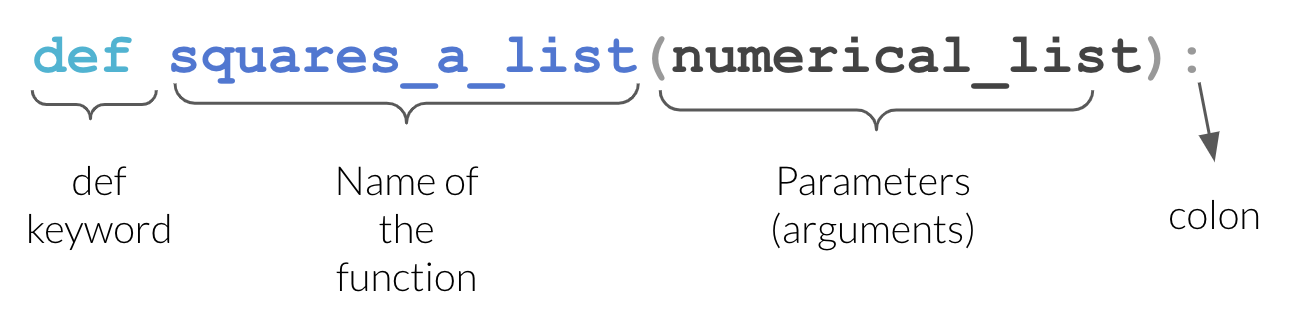
Source: UBC Master of Data Science, Programming in Python for Data Science
netis the parameter: a name that exists inside the function- Colon, then an indented block.
returnsends a value back to the caller.
Defining a function runs nothing. It only creates the tool.
Calling a Function
The value in the brackets is the argument. It is copied into the parameter net for the duration of the call.
return vs print
The most common beginner confusion: two functions that differ only in their last line.
123.0 is printed inside the function, but nothing comes back: a is None.
print shows a human. return gives a value back to the program. Analysis functions return.
Docstrings
The first string inside a function documents it.
Help on function add_vat in module __main__:

add_vat(net, rate=0.23)
    Return the gross amount for a net amount and a VAT rate.

    net:  the amount before VAT, in euros
    rate: the VAT rate as a decimal, 0.23 by default
Three lines of docstring now save you an hour in March.
Your Turn: Your First Functions
Write each function, with a one-line docstring:
celsius_to_fahrenheit(c)returnsc * 9/5 + 32margin(revenue, cost)returns(revenue - cost) / revenue * 100, rounded to 1 decimalgrade(mark)returns"First"from 70,"Pass"from 40,"Fail"below 40
Solution
def celsius_to_fahrenheit(c):
    """Convert a temperature from Celsius to Fahrenheit."""
    return c * 9/5 + 32

def margin(revenue, cost):
    """Return the profit margin as a percentage, to 1 decimal."""
    return round((revenue - cost) / revenue * 100, 1)

def grade(mark):
    """Return First, Pass or Fail for a mark out of 100."""
    if mark >= 70:
        return "First"
    elif mark >= 40:
        return "Pass"
    return "Fail"

print(celsius_to_fahrenheit(100), margin(1000, 620), grade(64))
212.0 38.0 Passreturn ends the function on the spot, so grade() needs no else.
2. Arguments and Scope
Positional and Keyword Arguments
Values given by position fill the parameters from left to right:
3500.0
59992750.125
Write the names yourself (keywords) and the order stops mattering:
Use keywords whenever a function takes more than two arguments.
Default Values
123.0
113.5
109.00000000000001- Parameters with defaults are optional
- They must come after the parameters without defaults
- This is how
round(x)andround(x, 2)can both work
Scope
Names created inside a function only exist inside it.
84--------------------------------------------------------------------------- NameError Traceback (most recent call last) Cell In[12], line 6 3 return hidden * 2 5 print(compute()) ----> 6 print(hidden) NameError: name 'hidden' is not defined
This is a feature: a function cannot silently break the rest of your notebook.
Scope, The Other Direction
A function can read names from outside:
123.0Warning
This works, and it is a trap. The function now depends on something invisible in its own definition. Change vat_rate elsewhere and the function quietly changes behaviour. Pass what you need as a parameter.
Functions Calling Functions
def add_vat(net, rate=0.23):
    return net * (1 + rate)

def invoice_total(prices, rate=0.23):
    """Return the gross total of a list of net prices."""
    total = 0
    for price in prices:
        total += add_vat(price, rate)
    return round(total, 2)

print(invoice_total([10.0, 25.0, 8.5]))
print(invoice_total([10.0, 25.0, 8.5], rate=0.09))
53.5
47.42Small functions combined beat one large one, every time.
Returning Several Values
4 563 140.8Python returns a tuple, which you unpack exactly as in lecture 3.
Your Turn: A Reusable Summary
Several return values
- Write
summarise(values)returning the min, max, mean and range (max minus min) - Unpack
summarise(sales)into four names and print them
Solution
sales = [120, 135, 148, 160, 240]
def summarise(values):
    """Return the min, max, mean and range of a list of numbers."""
    lo = min(values)
    hi = max(values)
    mean = sum(values) / len(values)
    return lo, hi, mean, hi - lo

lo, hi, mean, spread = summarise(sales)
print(f"min {lo}, max {hi}, mean {mean:.2f}, range {spread}")
min 120, max 240, mean 160.60, range 1203. Modules and Packages
Python Comes With Batteries
The standard library is installed with Python. You just have to import it.
math.sqrt reads as “the sqrt function from the math module”. The dot means “inside”.
Three Ways to Import
import x: safest, always clear where a function comes fromimport x as y: the standard for the big data librariesfrom x import y: convenient, but hides the origin
Installing vs Importing
A package is a collection of modules (.py files). Apart from the standard library, every package has to be installed before it can be imported:
- Install once per machine or environment:
!pip install seabornin Colab - Import once per session:
import seaborn as snsin each notebook
---------------------------------------------------------------------------
ModuleNotFoundError                       Traceback (most recent call last)
Cell In[20], line 1
----> 1 import definitely_not_a_real_package

ModuleNotFoundError: No module named 'definitely_not_a_real_package'
ModuleNotFoundError means it is not installed, or the name is misspelt. In Colab, every library we use this semester is already installed.
4. Paths and Getting Data Into Colab
Four Formats, Four Readers
Week 3 introduced CSV, JSON, Excel and Parquet. pandas reads all four, and the pattern is always the same: pd.read_something(where_it_is).
Four different files on disk, four one-line calls, and the same DataFrame out of each. read_excel needs the openpyxl package and read_parquet needs pyarrow: Colab has both, and next week you install them yourself.
But Where Is the File?
pd.read_csv("roasted_stores.csv") looks for that file on the machine running Python. In Colab, that machine is in a Google data centre, and your file is on your laptop. To bridge the gap, you need to say where a file is: its path.
- Absolute: starts at the root,
/Users/...on a Mac,C:/Users/...on Windows,/content/...in Colab, and works on no other machine - Relative: starts from wherever Python currently is, and travels with the project
- Folders are separated by
/. Windows writes\but accepts/: always give it/
The Colab Filesystem
Colab’s computer has its own disk. You start in its /content folder:
Look around: ! runs a line in the terminal, not in Python
/content
sales.csv  sample_data
Everything in /content is deleted when the runtime stops.
Copy the path, never type it
- Click the folder icon in the left sidebar
- Right-click your file, choose Copy path
- Paste it between the quotes:
pd.read_csv("/content/sales.csv")
Three Paths That Will Not Work
# 1. Incomplete: where does /path start? Nowhere on this machine.
pd.read_csv("/path/to/my/file.csv")

# 2. Missing the extension: "file" and "file.csv" are different names
pd.read_csv("C:/Users/damien/data/file")

# 3. Backslashes in a normal string: \t and \f are not folders
pd.read_csv("C:\Users\damien\data\file.csv")
The third one is the cruel one. \t means tab and \f means form feed, so Python never even sees the folder names. Use forward slashes, or put an r before the quote: r"C:\Users\damien\data\file.csv".
FileNotFoundError Is Not Mysterious
Ignore the twenty lines of traceback above it and read that last line: it means exactly what it says. Then four checks, in order:
!pwdand!ls: am I where I think I am, and is the file there?- Is the extension in the name? Windows and macOS both hide them by default.
- Is the spelling and the capitalisation right? Windows and macOS ignore capitals, but Colab runs on Linux, where
Stores.csvandstores.csvare two different files. - Did I copy the path, or type it?
Options 1 and 2: A URL or an Upload
Three ways to put a file where Colab can see it, and what each one costs.
1. Read straight from a URL, if the file is on the public internet:
One line, it survives a restart, and every dataset in this module is hosted this way. But only for public files: your employer’s sales data is not.
2. Upload by hand, which works for anything, including private data:
But the file lives in the runtime and disappears with it, so you upload it again every session.
Option 3: Mount Google Drive
- The file persists between sessions, because it is in Drive
- But: you authorise it in a pop-up every session, and your data has to live in Drive
- But: look at that path.
/content/drive/MyDrive/...is not where your file is.
Important
All three options are workarounds for one fact: the file is not on the machine running your code. Next week we move Python onto the machine where your files already are, and pd.read_csv("data/my_sales.csv") becomes the only line.
Your Turn: Modules and Data
pandas: readurlwithpd.read_csv(), then print its.shape(rows, columns)
You should see:
13.17 13.5 6.18
[2, 5, 1, 3, 1, 4, 4, 4, 6, 4]
(1704, 6)
Solution
5. Getting Help
help() and Signatures
Help on built-in function round in module builtins:

round(number, ndigits=None)
    Round a number to a given precision in decimal digits.

    The return value is an integer if ndigits is omitted or None.  Otherwise
    the return value has the same type as the number.  ndigits may be negative.
The first line is the signature. A parameter with no default, like number, is required; anything with an = is optional. pd.read_csv() has dozens of parameters, and only the first, the file, is required.
In Colab, round? shows the same help in a panel, and Shift+Tab inside the brackets shows the arguments as you type. You are not expected to memorise these. You are expected to find them.
Where to Look, In Order
help(function)or Shift+Tab in the notebook- The official documentation: docs.python.org, pandas.pydata.org
- A search engine, with the library name in the query
- An AI assistant, asking it to explain rather than just produce
- Stack Overflow, reading the accepted answer and the comments below it
Ask an assistant for “a Python function add_vat(net, rate=0.23) that returns the gross amount rounded to 2 decimals, with a docstring and three test calls”, not for “a function for vat”. The signature is yours: you decide what the function looks like, and the assistant fills it in.
Before Next Lecture
Important
Next week is a practical setup lecture: Python moves off Colab and onto your own laptop. Bring it, charged, with administrator rights if it is a work machine.
If you can, download these two installers for your operating system in advance. DCU wifi will not enjoy 60 people downloading them at once.
- Python 3.12 or 3.13: python.org/downloads
- VS Code: code.visualstudio.com
Do not run them yet. We do it together, in order: on Windows there is a checkbox on the first screen that must be ticked, and on macOS there is a step to run after the installer finishes.

Thanks for your attention and don’t hesitate to ask if you have any questions!